WordPress snippets
This section contains snippets that you can copy/paste in order to make the work faster and easier.
Custom WordPress theme
Folder structure
These are some suggestions on how to structure your theme files:
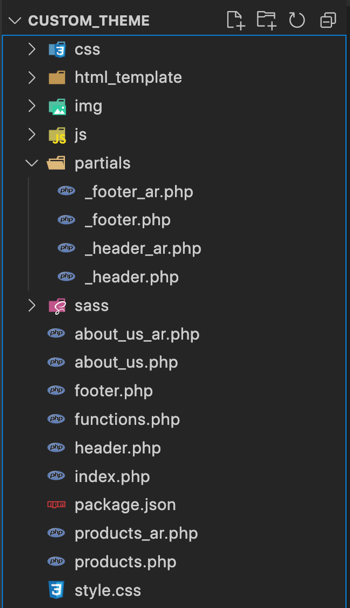
- css: css files
- html_template: place here the website html template, this is used as a reference, and in order to copy files from it to the actual theme (You can remove it after finishing the theme, or you can add it to .gitignore file)
- img: images files
- js: javascript files
- partials: place here the partial files that are included in other files (e.g header, footer, ...)
- sass: scss files (that will be 'compiled' into css files)
The style.css file contains details about the theme (e.g theme name, authour, and other stuff), for more info: https://developer.wordpress.org/themes/basics/main-stylesheet-style-css/
/*
Theme Name: custom theme
Author: Hassan Kanj
*/
- I usually call the theme "custom_theme", and its path is: wp-content/themes/custom_theme
- For english pages, I don't add anything at the end, but for arabic pages I add _ar to the file name, e.g products_ar.php, header_ar.php
- Add _ prefix before the partial file name [except for header.php and footer.php] (e.g _head_includes.php)
Divide template page into multiple files
When working with a theme, you have to divide a single page into multiple files, which is very helpful for code reusability and maintenance.
Add any partial file to the partials folder (except for header.php and footer.php which you should keep in the main directory since you will call them using get_header() and get_footer()).
For header.php place in this file the head section and part of the body that includes the header
<!DOCTYPE html>
<html lang="en">

<head>
    <meta charset="UTF-8">
    <meta name="viewport" content="width=device-width, initial-scale=1.0">
    <title>Website title here</title>
    <?php get_template_part('partials/_head_includes'); ?>
</head>

<body>
    <?php get_template_part('partials/_mobile_menu'); ?>
    <?php get_template_part('partials/_header'); ?>
- get_template_part() is used to include a file (and you can use it to send parameters as well), and in the above code I added multiple files in order to organize the code more, but you don't have to do the same though I recommend it.
<!-- Stuff related to Google fonts -->
<link rel="preconnect" href="https://fonts.googleapis.com">
<link rel="preconnect" href="https://fonts.gstatic.com" crossorigin>
<!-- Stuff related to Google fonts -->

<?php wp_head(); ?>
- wp_head() is important especially when adding plugins, and when using wp_enqueue_style() and wp_enqueue_script() to add css and js files (the included files will be added here), for more info: https://developer.wordpress.org/reference/functions/wp_head/
<header>Add header layout here (logo, navigation menu,...)</header>
<?php get_template_part('partials/_footer'); ?>
<?php wp_footer(); ?>
</body>
</html>
- Place footer.php in the main theme directory, and ends it with
</body></html> - wp_footer() is important especially when adding plugins, and when using wp_enqueue_script() to js files (the footer included files will be added here), for more info: https://developer.wordpress.org/reference/functions/wp_footer/
<footer>Add footer layout here (links, menu, copyright,...)</footer>
Include CSS + JS files (enqueue)
You can add CSS and JS files by using wp_enqueue_style() and wp_enqueue_script() and you can add the code to functions.php, and then the files will appear in the place of wp_head() or wp_footer() (based on whether you specified that the file should appear in the header or footer).
and when using these functions, you can specify the file version, which is useful to avoid serving an old file version from the cache after you update the file.
The src can be a link (e.g a Google font file)
function loadStylesheets()
{
    wp_register_style("tajawal_font", "https://fonts.googleapis.com/css2?family=Tajawal:wght@200;700&display=swap", [], 1, 'all');
    wp_enqueue_style("tajawal_font");

    wp_register_style("source-sans-pro-font", "https://fonts.googleapis.com/css2?family=Source+Sans+Pro:ital,wght@0,400;0,700;1,400&display=swap", [], 1, "all");
    wp_enqueue_style("source-sans-pro-font");

    wp_register_style("bootstrap", get_template_directory_uri() . "/css/bootstrap.min.css", [], 1, "all");
    wp_enqueue_style("bootstrap");

    wp_register_style("styles", get_template_directory_uri() . "/css/styles.css", [], $versionNumber, "all");
    wp_enqueue_style("styles");

    wp_register_style("slick", get_template_directory_uri() . "/js/slick-1.8.1/slick/slick.css", [], 1, "all");
    wp_enqueue_style("slick");
}

add_action("wp_enqueue_scripts", "loadStylesheets");

function loadJavascriptFiles()
{
    wp_deregister_script('jquery');
    wp_register_script("jquery", get_template_directory_uri() . "/js/jquery-3.5.1.min.js", [], 1, false);
    wp_enqueue_script("jquery");

    wp_register_script("bootstrap", get_template_directory_uri() . "/js/bootstrap.min.js", [], 1, false);
    wp_enqueue_script("bootstrap");

    wp_register_script("slick", get_template_directory_uri() . "/js/slick-1.8.1/slick/slick.min.js", [], 1, false);
    wp_enqueue_script("slick");

    wp_register_script("prmenu", get_template_directory_uri() . "/js/prmenu/prmenu.min.js", [], 1, false);
    wp_enqueue_script("prmenu");

    wp_register_script("custom", get_template_directory_uri() . "/js/custom.js", [], 2, false);
    wp_enqueue_script("custom");
}

add_action("wp_enqueue_scripts", "loadJavascriptFiles");
Retrieve items from the database
Retrieve pod items
There are different scenarios when retrieving item(s), we may want to retrieve a single item by its ID, or maybe multiple items, or multiple items based on a specific field value, etc..
I will show below different codes for different cases.
Get an item by its ID
// Note: I noticed that this function is causing an issue when used
// in a page that contains pagination, so instead of it you can
// use get_post_meta()

function getItemById($postId, $podType)
{
    $params = [
        'limit' => '1',
        "where" => "t.ID='$postId'",
    ];
    $item = pods($podType)->find($params);
    return $item;
}
Get items by language (with the option to order them based on a specific field)
function getItemsByLanguage($podType, $language = "", $orderBy = "", $orderDirection = "DESC")
{
    if (empty($orderBy)) {
        $orderBy = "t.ID";
    }

    if ($language != "arabic" and $language != "english") {
        exit("Error: unknown language, value should be arabic or english");
    }

    // get all items of type $podType
    $items = pods($podType);

    /*
        Note: For more details regarding the 'orderby'
        - https://docs.pods.io/code/pods/find/ (section: Additional Parameter Options)
        - https://docs.pods.io/code/pods/find/find-reference-table/
        - https://codex.wordpress.org/Database_Description#Table:_wp_posts
        */
    $params = [
        'limit' => '-1',
        "where" => "language.meta_value='$language'",
        "orderby" => "CAST( $orderBy AS SIGNED ) $orderDirection"
    ];


    $items->find($params);
    return $items;
}
Get items based on a foreign key
Let's say we have a product pod and store_category pod, here's how we can get all the products that belong to a certain store_category id
maybe in the future we can make the below function a general one that works with different pods
function getProductsByStoreCategoryId($storeCategoryId, $orderBy = "", $orderDirection = "DESC")
    {
        if (empty($orderBy)) {
            $orderBy = "t.ID";
        }

        // get all items of type $podType
        $items = pods("product");

        /*
        Note: For more details regarding the 'orderby'
        - https://docs.pods.io/code/pods/find/ (section: Additional Parameter Options)
        - https://docs.pods.io/code/pods/find/find-reference-table/
        - https://codex.wordpress.org/Database_Description#Table:_wp_posts
        */
        $params = [
            'limit' => '-1',
            "where" => "store_category.id='$storeCategoryId'",
            "orderby" => "CAST( $orderBy AS SIGNED ) $orderDirection"
        ];

        $items->find($params);
        return $items;
    }
// get all the products that belong to the store_category_id 45
$storeCategoryId = 45;
$items = getProductsByStoreCategoryId($storeCategoryId, "position.meta_value", "DESC");

while ($items->fetch()) {
    $title = $items->field("title");
    echo $title . "<br />";
}
Get items with pagination
// Note: you have to pass $wpdb, or it won't be defined
// This function will return $items and $pagination in an array
// You can remove $language if you have a single language in the website
function getProductsAndPagination($wpdb, $language)
{
    if ($language != "arabic" and $language != "english") {
        exit("Error: unknown language, value should be arabic or english");
    }

    $items = pods("product");

    /*
    Note: For more details regarding the 'orderby'
    - https://docs.pods.io/code/pods/find/ (section: Additional Parameter Options)
    - https://docs.pods.io/code/pods/find/find-reference-table/
    - https://codex.wordpress.org/Database_Description#Table:_wp_posts
    */

    $totalItemsPerPage = 5;
    $params = [
        'limit' => $totalItemsPerPage,
        "where" => "language.meta_value='$language'",
        "orderby" => "t.ID DESC"
    ];


    $items->find($params);

    $pagination = "";

    if ($language == "english") {
        $pagination = $items->pagination(['type' => 'advanced']);
    } else if ($language == "arabic") {
        $pagination = $items->pagination(
            [
                'type' => 'advanced',
                'first_text' => '« الصفحة الاولى',
                'prev_text' => '‹ السابق',
                'next_text' => 'التالي ›',
                'last_text' => 'الصفحة الأخيرة »',

            ]
        );
    }

    return ['items' => $items, 'pagination' => $pagination];
}
// get the products and show pagination (page numbers, prev, next,...)
$itemsAndPagination = getProductsAndPagination($wpdb, "english");

$items = $itemsAndPagination["items"];

while ($items->fetch()) {
    $title = $items->field("title");
    echo $title . "<br />";
} // while $items->fetch()

$pagination = $itemsAndPagination["pagination"];
echo $pagination;
?>
Retrieve configs list item
"configs list" is basically a list of configs that the admin can change and which contains some different stuff that are related to the website, so in this case the admin can easily change certain info from the admin panel without asking you to do that for them (some examples include: phone number, email, address, Facebook link, instagram link, etc..).
for this to work you will have to create a configs_list pod.
Here's an example on how to retrieve configs_list items:
if the configs_list field name is facebook_link for example, then to get its value you should prefix the name with configs_list so the final name will become configs_list_facebook_link
// you can get a normal text field
echo get_option("configs_list_facebook_link");

// you can also get text that contains html
echo get_option("configs_list_about_us_description")
Retrieve PDF
Let's assume you added a pdf field called pdf_1, here's an example how to get its data:
$pdf1Array = $item->field("pdf_1");
$pdfInfo   = $pdfArray[0];
$pdfTitle  = $pdfInfo['post_title'];
$pdfUrl    = wp_get_attachment_url($pdfInfo['ID']);
Retrieve post thumbnail
First you can define a specific post in functions.php using the function add_image_size()
add_image_size("project-thumbnail", 350);
add_image_size("141px-thumbnail", 141, 141, true);
For more info about add_image_size(): https://developer.wordpress.org/reference/functions/add_image_size/
And to retrieve a post thumbnail url by post id:
$thumbnailUrl = get_the_post_thumbnail_url($items->field("id"), "141px-thumbnail");
In case thumbnails weren't appearing correctly (with the correct size), try to regenerate the thumbnails using this plugin: https://wordpress.org/plugins/regenerate-thumbnails-advanced/